I am writing and sharing this article after ten months of taking the GitLab Certified Security Specialist exam. GitLab recently revamped it under a different title that’s more accurate and makes more sense. I had to face a moment of a “WH” question from my senior colleague at work about taking the GitLab Certified Security Specialist exam. The exam wouldn’t be enough to justify the skills and experience. We have been using GitLab probably in a way more customized cum advanced for our convenience. I have a subtle dilemma about best practices and the right way to use technology, and a curious mind that asks, “How are they doing this?” I keep wondering if there’s a perfect way to do it. When it feels like what you are doing isn’t really wrong, but you don’t know what is meticulously right either?
Probably, I care to write this now because my AI subscription quota is surpassed, and it’s dark out there to touch the green grass; all I have left is my computer and some blurry memories of the GitLab Security Specialist exam. While I also want to promote myself that I found a security vulnerability in the feature/section this exam focuses on, i.e Security Dashboard, and it took me a while to spot that flaw and become the second person to uncover that – you read it right: duplicate! Expected when Artificial Intelligence(AI) has changed the velocity of Vulnerability Research and Pentesting.
About the Exam
The Gitlab Certified Security Specialist was paid and unproctored with Theoritical and Hands on exam which availabe to singup at Gitlab University now the exam has been coined as a Gitlab Certified Security Associate where you need to answer MCQ’s and solve the Labs, MCQs are mostly about the features and little bit of scenario based qestions. In contrast, the Hands-on exam is an assigned GitLab group where you have ownership. You need to set up the security pipeline and policies as per the questions; pretty straightforward, but the procedure needs to match exactly. And the exam itself says, “This course is not appropriate for students without any Git, GitLab, or GitLab CI/CD knowledge.” You may want to get your hands a little dirty with GitLab using the available resources beforehand. After you set up the GitLab Groups/Project/Repos as per the questions, you need to submit the assessment and wait for a week. This probably means the exam is/was manually graded/checked, but I saw recent information that the grading and results were automatic for some users.
There isn’t much difference between GitLab Certified Security Specialist (Legacy) and GitLab Certified Security Associate, except for some upgrades and theoretical questions.
What is inside?
The exam mainly cares about your ability to incorporate security tools into the pipeline, work with security policies across projects and teams, manage vulnerabilities effectively in the GitLab Security Dashboard, and use all your superpowers to prevent a catastrophe. The actual CI pipeline needs:
include:
– template: Jobs/SAST.gitlab-ci.yml
– template: Jobs/Secret-Detection.gitlab-ci.yml
– template: Jobs/Dependency-Scanning.gitlab-ci.yml
– template: Jobs/Container-Scanning.gitlab-ci.yml
– template: Jobs/SAST-IaC.gitlab-ci.yml
– template: Security/DAST.gitlab-ci.yml
where we have a list of security tools that GitLab incorporates into the pipeline, while you have the freedom to pick and choose tools based on your codebase and project metadata https://gitlab.com/gitlab-org/gitlab/-/tree/master/lib/gitlab/ci/templates/Security
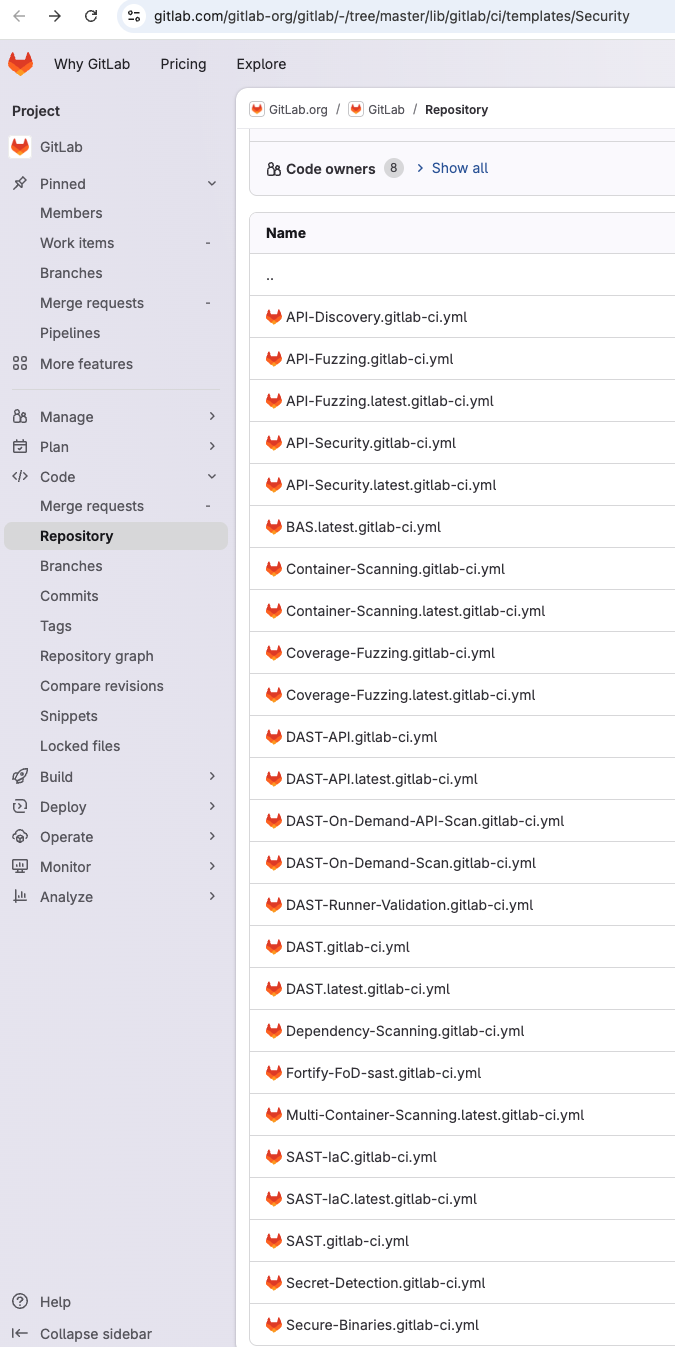
It’s in your best interest to explore and try them all, but you don’t necessarily have to care about all tools, implementation and usage to pass the exam. Many security tools used by GitLab are open source and can be fully customized to your needs. If you like challenges, extend it to build your own pipeline with additional tools. Here is the table view for people who prefer simplicity, plus a breakdown of the tool implementations you will learn and need to know to pass the exam.
| Tool Name | Details |
| SAST | Semgrep with GitLab’s rules and GitLab Advanced SAST, which does cross-file data flow to reduce false positives |
| Secret Detection | Gitleaks to search for crown jewels like API keys, private certificates, passwords, etc |
| Container Scanning | Trivy to uncover CVEs in the image you ship, mostly base-image packages |
| DAST | OWASP ZAP for simulating real dynamic security testing |
| Dependency Scanning | Catch CVEs in your dependencies, plus the SBOM that license compliance uses to separate permissive from copyleft. |
| IaC | Kics to find misconfigured Terraform, CloudFormation, Kubernetes, Ansible, etc |
| Coverage Fuzzing | GitLab Cov Fuzz for finding unexpected crashes in software |
On top of these tools is an interesting GitLab feature called Security Policies, which you need to cover and implement in the exam labs as well; mostly, it was the Merge Request (MR) policy. I strongly believe this is useful because it can stop developers from making mistakes or doing pretty naive things unknowingly. Security policies are like barricades. You already have organizational policies – an HR policy, a Travel policy, and so on. Still, those are on paper, and you cannot ensure everything in them is actually being followed. Here, the policies are intact and always effective because we embed them in the technology, and there are fewer chances of not following them. And while you can adjust the settings, these are the ones GitLab provides.
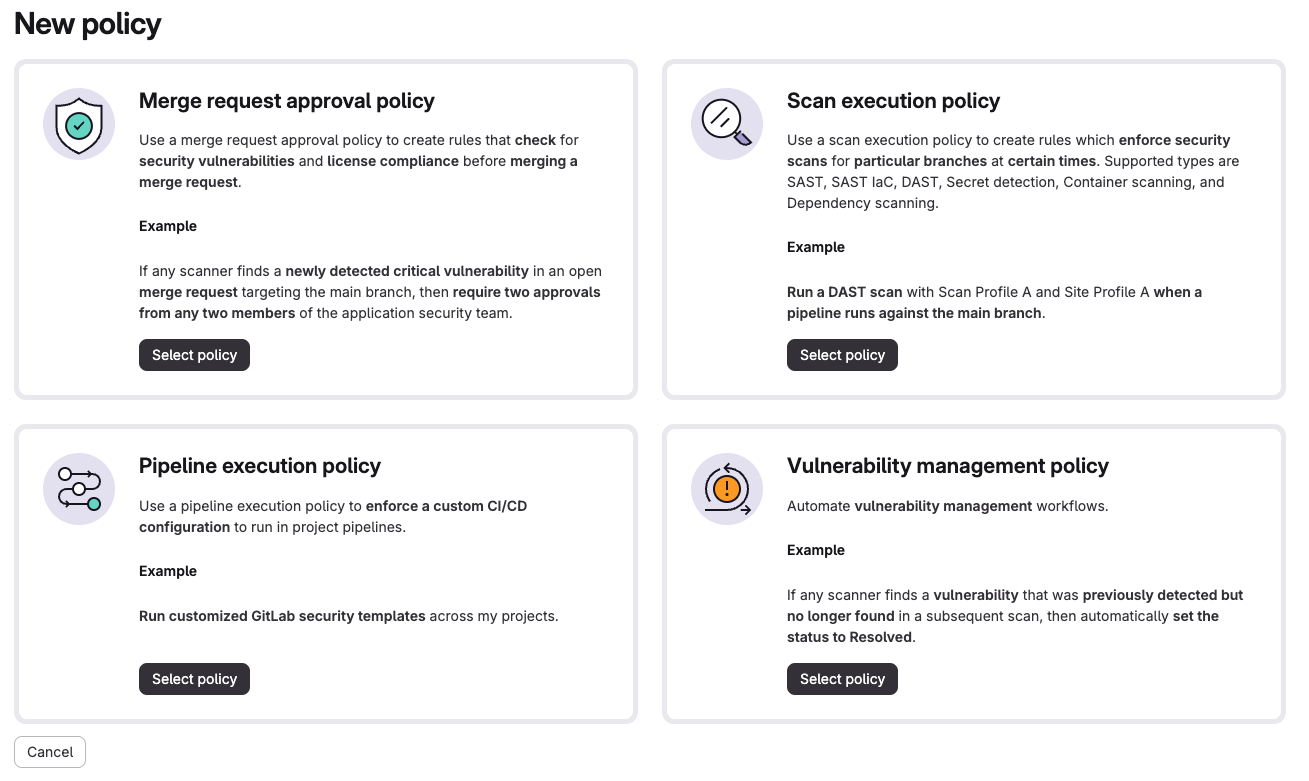
As the screenshot above shows, there are four types of security policies. It would not be very informative to repeat and explain the same thing, so I will tell you what is not provided above. The security policies are inline as well: they are saved in a YML file in a repo linked to the source repositories. If possible, every product and every codebase must have security policies. Shifting left is what we need; as soon as the code is about to land in the VCS, the policies start working.
But honestly, what matters most is vulnerability management policies and timely remediation. CVSS and the vulnerability scoring system don’t understand business context or what matters most to the business. So, after real vulnerability triage and validation from the security team, action needs to be taken. The vulnerability management system in GitLab just works. It is not that fancy or great, but it is enough for the purpose.
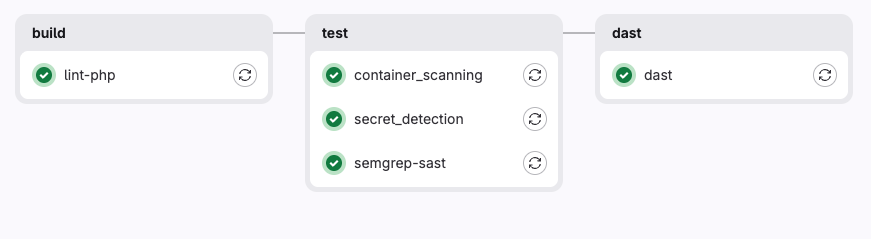
The practical exam was simple, and the theoretical part was not that deep either. It was mostly seeking experience. The questions were about CI/CD understanding, like where vulnerabilities actually lie, what the ways are to enable specific things, how you triage them, and some basic troubleshooting as well.
You can pretty much memorize which stage a security scanner runs in if you’ve either watched a pipeline fail. Nothing in the syllabus is hard on its own. It checks whether you recognize a situation. If you have spent a week plumbing up scanners, the exam will feel easy and a bit boring. If you have only read about them for a week with no actual hands-on experience, it will feel slippery, and you will not really know why your answers keep coming out wrong. That is the most defensible thing about the certification, I think. It is also what makes my colleague’s objection hard to argue with. It does not teach you the work. It only checks that you have already done it.
This was my badge from Credly; the new ones are probably a little different. https://www.credly.com/badges/078a9edd-42a3-458a-a6e8-d3b49e2d81f9
Go or No?
Sometimes certification exams are for growth, career transition, and probably levelling up or getting a new job, etc. For me, it was none of them. Since I believe in DIY, if you can manage the trial or actual licence for GitLab Ultimate, then I suggest you learn with a trial-and-error method, and there are tons of resources on the internet. But remember, the security pipeline shown above or described is Nothing like what you’ll see in real organizations and engineering teams; it gets complex, and it is never as plain-vanilla or ABC. Either way, you will not learn great security plumbing from the exam, but you will learn through the experience of working, failing, solving, and mastering. My main motive was to explore and challenge security pipeline usage in my own way, and I eventually figured out quite a few untouched paradigms. From finding the vulnerability itself in GitLab to a pretty cool AI-stacked security tool, my takeaways were the ideas.
Could have been better?
I understand tool worship, and getting married to the security tools ecosystem in Application Security isn’t a great choice. Still, it comes with ease of use and less human workforce engagement. GitLab Security definitely solved the problem, but I noticed there isn’t any coverage about package registries and their security, which is strange given how much modern risk comes through dependencies. Also, There’s Nothing about how AI tooling artifact (AGENTS.md, CLAUDE.md, etc.) scanning rulesets for SAST and secret scanners work on what ends up in a repository; for example, AI agent file detection isn’t caught by secret scanners. And on top of that, there is DAST, which exam treats as just another checkbox to add to the pipeline. I am not a big fan of DAST in a CI/CD pipeline, and the tested DVWA lab gave me a number for why. I ran it against DVWA, an application made entirely out of known vulnerabilities, and it returned me three findings. All three of them were about HTTP header security. No SQL injection, no XSS, and Nothing. That’s what blind DAST looks like when it knows Nothing about the code underneath. DAST is useful when it has context and credentials, followed by SAST and AI as a driver and a target it actually understands. Plumbed into a pipeline with default settings, it mostly produces a green checkmark and a false sense of coverage.
I’d like to thank my employer and the director of InfoSec for providing me the opportunity to take the certification exam.
Alright, I’m signing off here since I just noticed that my AI usage limit has been restored. Keep doing great things with Artificial Intelligence!